
X10
 X10 – Meaning
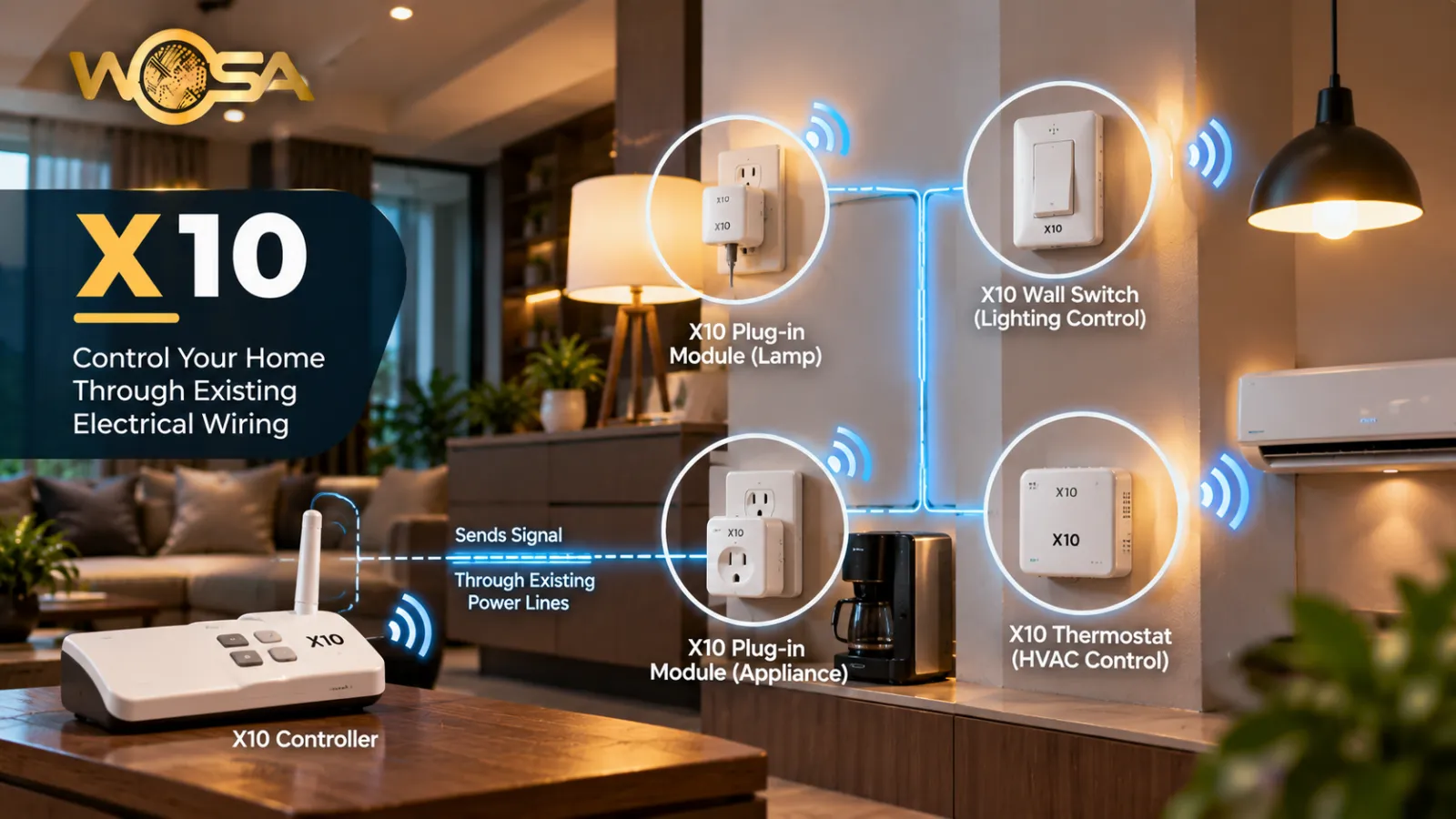
X10 is an early home automation communication technology that allowed compatible devices to exchange control signals, traditionally over a property's electrical wiring.
In a modern smart-home environment, X10 is best understood as part of a larger connected system rather than as an isolated feature. Homeowners, designers and automation professionals may use the term when discussing convenience, control, comfort, security, energy management or the reliable operation of connected equipment. Its practical value depends on how it is selected, installed, configured and connected with the rest of the property.
For a broader understanding, start with Home Automation. The concept can then be connected with Central Control, Curtain Automation, Geofencing, depending on the requirements of the project.
How X10 Works
The way X10 works depends on the technology, product and automation architecture used in a project. A typical setup begins with an input, device, condition or user command. That information is processed by the relevant controller, platform or automation logic, and an output or action is then carried out. In some systems the processing happens locally, while other solutions may use a network, gateway, cloud service or a combination of these.
For example, a smart-home installation may connect sensors, switches, controllers and loads so that one event can initiate a predefined response. The same principle can apply to lighting, climate, security, entertainment, access or motorised systems. Related concepts such as Central Control, Curtain Automation, Geofencing, Home Automation, Hub help explain how individual components communicate and participate in a complete automation solution.
The exact implementation should always follow the manufacturer's specifications, the electrical and networking requirements of the property, and the design approach used by the automation professional.
Why X10 Matters in Smart Homes
The importance of X10 comes from its role in making a smart-home system more coordinated and useful. Modern properties can contain many independent devices, but the user experience improves when these devices can work together through clearly defined rules and interfaces. A well-designed system can reduce repetitive manual actions, provide more consistent control and make everyday routines easier to manage.
Depending on the application, X10 can contribute to convenience, comfort, security, energy awareness, accessibility or entertainment. It may also help create a more predictable user experience because actions can be triggered by schedules, sensors, scenes, commands or system conditions.
For projects that use multiple technologies, interoperability becomes important. Terms such as Gateway, Central Control, Scene Control and User Interface (UI) describe common parts of the wider automation environment.
Applications of X10
X10 can be relevant in different types of residential and smart-building projects. In a home, it may support a single room, an entire floor or a whole property. In larger installations, the same concept can be integrated into multiple zones with central monitoring and coordinated control. The appropriate application depends on the project brief, technical requirements and the devices being connected.
- Residential applications: supporting everyday routines, comfort and convenient control.
- Luxury homes: coordinating multiple systems through scenes, panels, apps or other interfaces.
- Renovation projects: integrating selected automation functions into an existing property.
- New construction: planning wiring, networking, control hardware and automation logic from the design stage.
- Smart-building environments: connecting relevant systems for monitoring and coordinated operation.
When several functions are combined, internal glossary concepts such as Central Control, Curtain Automation, Geofencing, Home Automation, Hub can help explain the relationship between the individual components.
Benefits of Using X10
The potential benefits of X10 depend on the way it is designed and used. A correctly configured system can make controls easier to access, improve consistency and support automation routines that match the occupants' needs. It can also reduce the number of separate interfaces a user has to manage when different systems are integrated through a common platform.
Another benefit is scalability. A well-planned automation architecture can allow additional compatible devices or functions to be introduced later, subject to the limitations of the selected system. This is especially useful when a homeowner wants to start with a few functions and expand the smart-home environment over time.
However, automation should not be judged only by the number of connected devices. Good design also considers reliability, usability, maintainability, network performance, electrical safety, cybersecurity and the long-term availability of compatible products.
Design and Installation Considerations
Before implementing X10, it is useful to define what the system needs to accomplish. The project team should consider the desired user experience, compatible technologies, control points, network requirements, power requirements and integration with existing equipment. If the property already contains automation products, compatibility should be checked before adding new components.
For wired installations, cable routes, panels, power supplies and commissioning requirements may need to be planned early. Wireless systems require attention to coverage, interference, device placement and network reliability. Hybrid installations may combine both approaches. The right choice depends on the building, project scope and required performance.
Commissioning is also important. Devices should be tested individually and as part of the complete automation sequence. Users should receive clear instructions for normal operation, and documentation should be maintained so that future changes can be made efficiently.
X10 and Related WOSA Glossary Concepts
Understanding X10 becomes easier when it is viewed alongside related terminology. Useful reference terms include Central Control, Curtain Automation, Geofencing, Home Automation, Hub. These concepts can describe the communication method, control layer, sensor, actuator, interface or automation logic that works alongside the main technology.
For example, a smart-home system may use a Trigger to start an action, a Sensor to provide information, a Home Automation to process the logic, and a connected device to perform the result. A Scene Control approach can then combine several actions into a single user command.
These relationships are important because a successful smart-home solution is normally a coordinated system. The glossary terms should therefore be considered as connected building blocks rather than isolated definitions.
Choosing and Maintaining a X10 Solution
When choosing a solution involving X10, compare the functional requirements of the property with the capabilities of the proposed products. Consider compatibility, installation requirements, control options, expandability, maintenance and the level of support available. Avoid selecting equipment only because it is marketed as smart; it should also fit the overall automation architecture.
Maintenance may include firmware or software updates, checking device communication, reviewing automation rules, testing connected equipment and keeping configuration records current. In larger projects, documentation can make troubleshooting significantly easier because installers can identify which devices, networks and automation rules are involved.
Users should also understand what happens if connectivity or power is interrupted. Where appropriate, systems should provide sensible local control or fallback behaviour so that essential functions remain usable.
Practical Example of X10
Consider a modern residence where multiple smart-home functions are connected. A user may interact with a wall-mounted panel, mobile app or another interface. A defined condition or command starts the relevant automation sequence, and the system communicates with the required devices. Depending on the application, lighting, climate, curtains, security or entertainment equipment may respond together.
This example shows why X10 should be evaluated within the complete system. The technology itself is only one part of the solution; network connectivity, control logic, compatible devices and user interfaces all influence the final experience. Related terms such as Central Control, Curtain Automation, Geofencing provide useful context for understanding that complete architecture.
Frequently Asked Questions
What is X10?
X10 refers to X10 is an early home automation communication technology that allowed compatible devices to exchange control signals, traditionally over a property's electrical wiring. Its role depends on the specific technology and automation design used in the property.
How is X10 used in home automation?
X10 can be used as part of an integrated automation setup to support the function it is designed for. It can work with related systems such as Central Control, Curtain Automation or Geofencing, depending on the project.
What are the benefits of X10?
The benefits can include more convenient control, better coordination of connected functions and support for automated routines. The actual result depends on correct product selection, configuration and installation.
Does X10 work with other smart-home systems?
Compatibility depends on the product, communication method and automation platform. Integration may involve technologies or components such as Home Automation and other compatible devices.
What should be considered before installing X10?
Consider compatibility, wiring or wireless coverage, power requirements, control methods, reliability, maintenance and future expansion. Professional planning is recommended where electrical, HVAC, security or network systems are involved.
Key Takeaway
X10 is a useful concept within the wider WOSA home-automation glossary. Its practical role depends on the project requirements, selected technology and the way it is integrated with other systems. A well-planned installation should focus on reliable operation, clear user control, compatibility, scalability and maintainability rather than simply adding more connected devices.
For further reading, explore these related glossary terms: Central Control, Curtain Automation, Geofencing, Home Automation, Hub.